Compare
ReportRoom vs Storydoc
Storydoc is the closest product philosophy to ReportRoom on this list: both replace attachments with tracked, mobile-responsive live web pages. The difference is where content comes from and what you pay for the pipe. Storydoc is an editor — you build interactive decks inside its browser tool, with AI writing credits, templates, and embeds. ReportRoom is a publishing layer — you (or your AI agent) send finished Markdown or HTML over API/MCP and get back a designed, analytics-instrumented URL in one call. This page compares them honestly, including the places Storydoc is genuinely ahead.
- Pick ReportRoom if your content already exists (or an agent writes it) and you want it published, tracked, and cheap.
- Pick Storydoc if you want to build interactive decks in a guided AI editor with embeds and CRM sync.
- Biggest gap: at the entry price ReportRoom hosts 20× the documents for half the money, with the API on every plan.
Choose ReportRoom if…
- You want a free tier — 10 live tracked documents at $0 (Storydoc offers a trial, not a free plan).
- Price: $9.99/mo for 100 live documents vs $19.80/mo (billed annually, $237.60/yr) for 5 active documents on Storydoc's Starter.
- You want API/MCP publishing on every plan — Storydoc's API and deck automation are real, but they're a Team-tier (custom pricing) feature; ReportRoom's Free plan already has the REST API and MCP publishing & analytics tools (the data-room tools require Business).
- Your content is produced by AI agents, scripts, or pipelines — no browser editor in the loop.
- You also need data rooms (Business, $59/mo) — Storydoc doesn't offer them.
Choose Storydoc if…
- You want to author inside a guided AI slide editor with templates, forms, and embeds — Storydoc's editor is genuinely good and ReportRoom deliberately isn't an editor.
- Engagement-depth analytics on ordinary links matter most: Storydoc tracks time per slide, read-to-bottom completion, and an engagement score, and can sync it to your CRM (Pro+). ReportRoom's per-viewer analytics live in data rooms, not on every link.
- Interactive elements — embedded Calendly, forms, live chat, Tableau/Power BI — are the core of your decks.
- You want AI writing/image credits bundled into the subscription rather than pay-as-you-go.
Side by side
| Feature | ReportRoom | Storydoc |
|---|---|---|
| Free plan | Yes — 10 live documents, analytics included | No free plan; free trial |
| Paid entry price | $9.99/mo flat ($8/mo annual) | $19.80/mo billed annually ($237.60/yr); $36/mo Pro |
| Documents at entry tier | 100 live documents (Pro) | 5 active documents (Starter) |
| View analytics | Daily views on every plan incl. Free; per-viewer analytics in data rooms | Per-slide time, completion, engagement score; "basic" on Starter, extended on Pro |
| CRM sync of analytics | No native integrations — pull anything over the analytics API | Native Salesforce/HubSpot/Pipedrive integrations on Pro and up |
| Authoring | Bring your content — Markdown/HTML via API, MCP, or dashboard | In-browser AI slide editor with templates & embeds |
| API / programmatic publishing | Every plan, incl. Free — REST + MCP publishing & analytics (data-room tools require Business) | Team tier only (custom pricing): template-based deck automation API |
| AI-agent (MCP) support | Native MCP server, all plans | MCP for its docs portal; no product MCP for agents |
| Data rooms | Yes — Business, $59/mo | No |
| Branding removal | From Pro ($9.99/mo); free tier carries a badge | On all paid tiers |
| Custom domain | Team plan and up ($19/seat/mo) | Branded subdomain on Pro; whitelabel on Team; self-hosting is an extra-fee add-on |
| PDF export | Yes (credit-metered) | Yes, all tiers |
What each product actually is
Storydoc sells a creation experience: an AI-assisted browser editor that turns prompts and templates into interactive scroll-based decks — with embedded calendars (Calendly, HubSpot), forms, videos, live chat, even Tableau and Power BI blocks — hosted on Storydoc's infrastructure with engagement tracking. Its buyers are sales and marketing people who want a deck that behaves like a funnel.
ReportRoom sells a publishing pipe: Markdown or HTML in, a designed live page out, with the design system applied server-side so even raw agent output comes back presentable. There's no editor to learn because there's no editor — the assumption is your content already exists (you wrote it, or your agent did) and the missing piece is a beautiful, tracked place for it to live. That's also why ReportRoom's API isn't an upsell: on Storydoc, programmatic publishing is a Team-tier feature with custom pricing; on ReportRoom it's the front door, available on the free plan.
Analytics, in detail
Storydoc tracks time spent per slide, whether the reader got to the bottom, drop-off points, CTA clicks, and an auto-calculated engagement score, with live email alerts on reading sessions and native CRM sync (Salesforce, HubSpot, Pipedrive) from the Pro tier. Per-viewer attribution works by generating a unique URL per recipient. The pricing page splits this as "basic" analytics on Starter vs "extended" on Pro.
ReportRoom counts real page views cookielessly, rolls them up daily, and exposes everything over GET /v1/documents/:slug/analytics and the MCP get_analytics tool — including a ready-to-relay plain-language summary, so an agent can tell you "the proposal got 31 views this week, peaking Thursday" without you opening a dashboard. Viewer-level identity lives in data rooms (Business plan): admit viewers by email grant or passcode, see per-viewer activity, revoke access — the setup where knowing exactly who is reading actually has teeth, because access is authenticated rather than inferred from a forwarded link.
Publish in one call
ReportRoom's entire publishing workflow is one HTTP call. Send Markdown (or your own HTML) and get back a live, tracked URL:
curl -X POST https://api.reportroom.io/v1/documents \
  -H "Authorization: Bearer rr_live_…" \
  -H "Content-Type: application/json" \
  -d '{
    "type": "report",
    "title": "Q3 Client Report",
    "content_format": "markdown",
    "content": "# Q3 results\n\nOrganic traffic +34%…"
  }'

# → { "url": "https://yourhandle.reportroom.io/q3-client-report", … }
Re-publishing the same slug updates the document behind the same link. For AI agents it's even shorter — connect the MCP server once and publishing becomes a sentence:
claude mcp add --transport http reportroom https://mcp.reportroom.io/mcpAfter that, "publish this analysis as a report and tell me tomorrow who read it" is a complete workflow: the agent calls publish, gets the URL, and later calls get_analytics, which returns daily view counts plus a plain-language summary written for agents to relay. 23 MCP tools cover publishing, design lint, images, data rooms, and analytics — publishing, images, and analytics work on every plan, including Free; the data-room tools require the Business plan.
What switching actually involves
- Your decks are web content already — Storydoc and ReportRoom both render to responsive web pages, so the content model translates: sections become slides (
---breaks in Markdown) or report sections. An AI agent pointed at an existing Storydoc URL can re-draft it as Markdown in minutes. - What you lose: Storydoc's in-deck interactive embeds (Calendly blocks, forms, live chat). If a deck is doing lead-capture work mid-scroll, that piece stays with an editor-based tool. ReportRoom pages link out rather than embed funnels.
- What you gain: no per-document cap anxiety at the entry price (100 live documents on Pro vs 5 on Starter), API publishing without a custom-priced Team contract, and data rooms when a deal needs gated access.
- Links in the wild — old Storydoc links keep working on Storydoc; swap the link at the source and let old threads age out.
Pricing
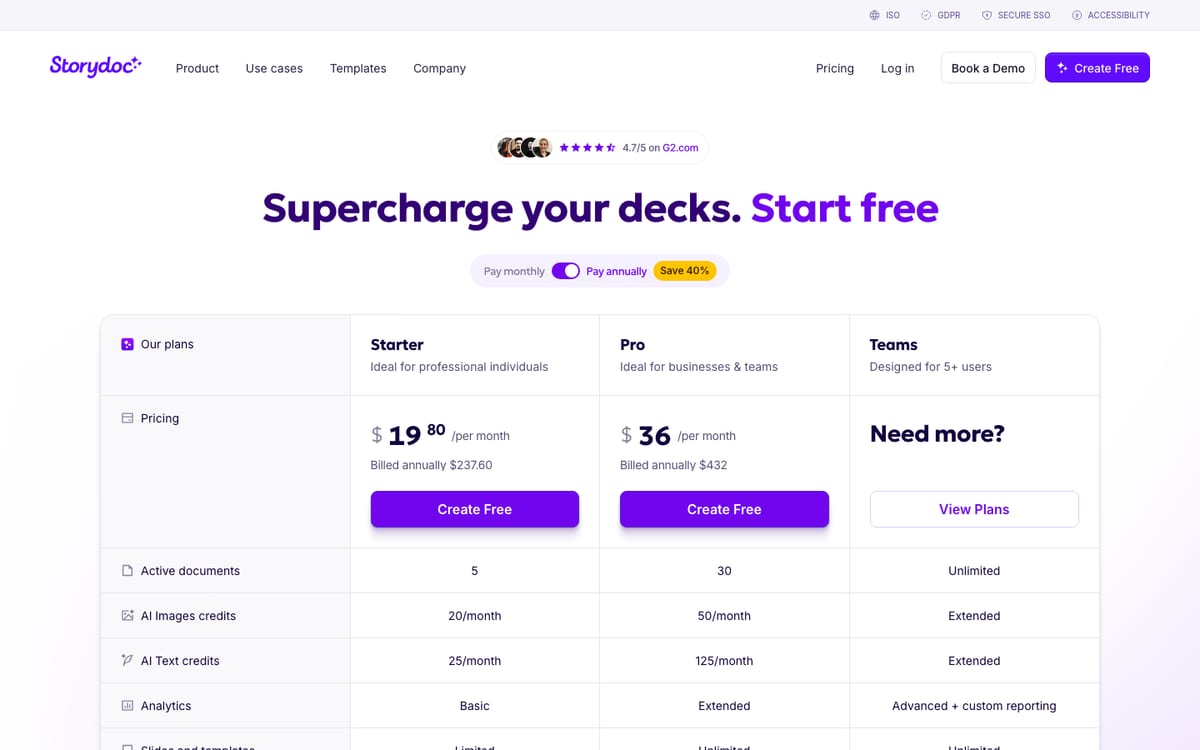
Storydoc's published pricing (checked August 2026, screenshot above): Starter $19.80/mo billed annually ($237.60/yr) with 5 active documents, basic analytics, and limited integrations; Pro $36/mo billed annually ($432/yr) with 30 active documents, extended analytics, and CRM integrations; Teams is quote-based for 5+ users and is where API access and whitelabel subdomains live. There's no permanent free plan. ReportRoom: Free $0 with 10 live documents and full view analytics; Pro $9.99/mo (or $8/mo billed annually) with 100 live documents and no ReportRoom badge; Team $19/seat/mo adds custom domains and unlimited documents; Business $59/mo adds data rooms. Like-for-like, ReportRoom's paid entry is half Storydoc's price for 20× the documents — and the API that Storydoc reserves for its Teams tier is on ReportRoom's free plan.
Three scenarios, annual billing
| Scenario | ReportRoom | Storydoc |
|---|---|---|
| Just starting — a few tracked decks or reports | Free — $0 | $237.60/yr (Starter, annual billing) |
| Freelancer with ~20 live client documents | Pro: $96/yr ($8/mo annual) | Pro: $432/yr (Starter's 5-doc cap forces the upgrade) |
| Publishing from scripts or an AI agent | Any plan — API/MCP included, from $0 | Team tier, custom pricing (API is Team-only) |
FAQ
Is there a free Storydoc alternative?
Yes. ReportRoom's Free plan hosts 10 live tracked web documents at $0 with analytics included. Storydoc offers a free trial but no permanent free plan.
How much does Storydoc cost in 2026?
Per its pricing page in August 2026: Starter $19.80/mo billed annually ($237.60/yr) with 5 active documents, Pro $36/mo billed annually ($432/yr) with 30, and a quote-based Teams tier for 5+ users. API access and whitelabel subdomains are Teams-tier features.
Does Storydoc have an API?
Yes — a real one (template-based deck automation, per-recipient versions, analytics queries), but it's gated to the quote-based Teams tier. ReportRoom's REST API and MCP server are available on every plan including Free, because programmatic publishing is the product's front door, not an enterprise add-on.
What's the main difference between ReportRoom and Storydoc?
Storydoc is an editor — you build interactive decks inside its browser tool. ReportRoom is a publishing layer — you or your AI agent send finished Markdown/HTML over API or MCP and get back a designed, tracked live URL. If your content already exists, you don't need an editor in the middle.
Whose analytics are better?
Different strengths. Storydoc goes deeper on ordinary links: per-slide time, completion, engagement score, CRM sync (Pro+). ReportRoom reports daily views on every plan, makes everything available to software via API/MCP with an agent-readable summary, and does per-viewer analytics inside authenticated data rooms — where viewer identity is real, not inferred.
Can AI agents publish documents to ReportRoom?
Yes — that's the core design. ReportRoom ships an MCP server (mcp.reportroom.io/mcp) with 23 tools covering publish, design lint, analytics, and data rooms, so Claude and other MCP-capable agents publish directly and report back who read what.
Does Storydoc have data rooms?
No. ReportRoom's Business plan ($59/mo, 3 seats included) adds data rooms with per-viewer email/passcode access, revocable grants, and per-viewer analytics.
Can I remove branding / use my own domain?
ReportRoom: the badge disappears from Pro ($9.99/mo) up, and custom domains come with Team ($19/seat/mo). Storydoc: branding removal on paid tiers, a branded storydoc.com subdomain on Pro, whitelabel subdomain on Teams, and self-hosting on your own domain as an extra-fee add-on.
Publish something beautiful in the next five minutes
10 tracked documents free, no card. Your first live URL is one call — or one paste — away.